Multi-login lets one registered name sign in from several devices at the same time, while other users see a single user.

- Other users, linked servers and guilds see one user; the user list and user count also count one
- Sign-in and sign-out are announced only when the first device signs in and when the last device signs out
- Closing one device keeps the user signed in while another device remains
- Each device joins channels on its own
Private messages

Incoming private messages reach every device. A message you send from one device is copied to your other devices as if it came from the other person, so you can follow the conversation anywhere. A device with an auto-reply set may also auto-reply to such a copy, and that reply reaches the other person.
Message syncing is done by the server, so it works with existing OpenNap clients such as Utatane without any client-side support. naptify-client will support it natively.
Shared files and downloads
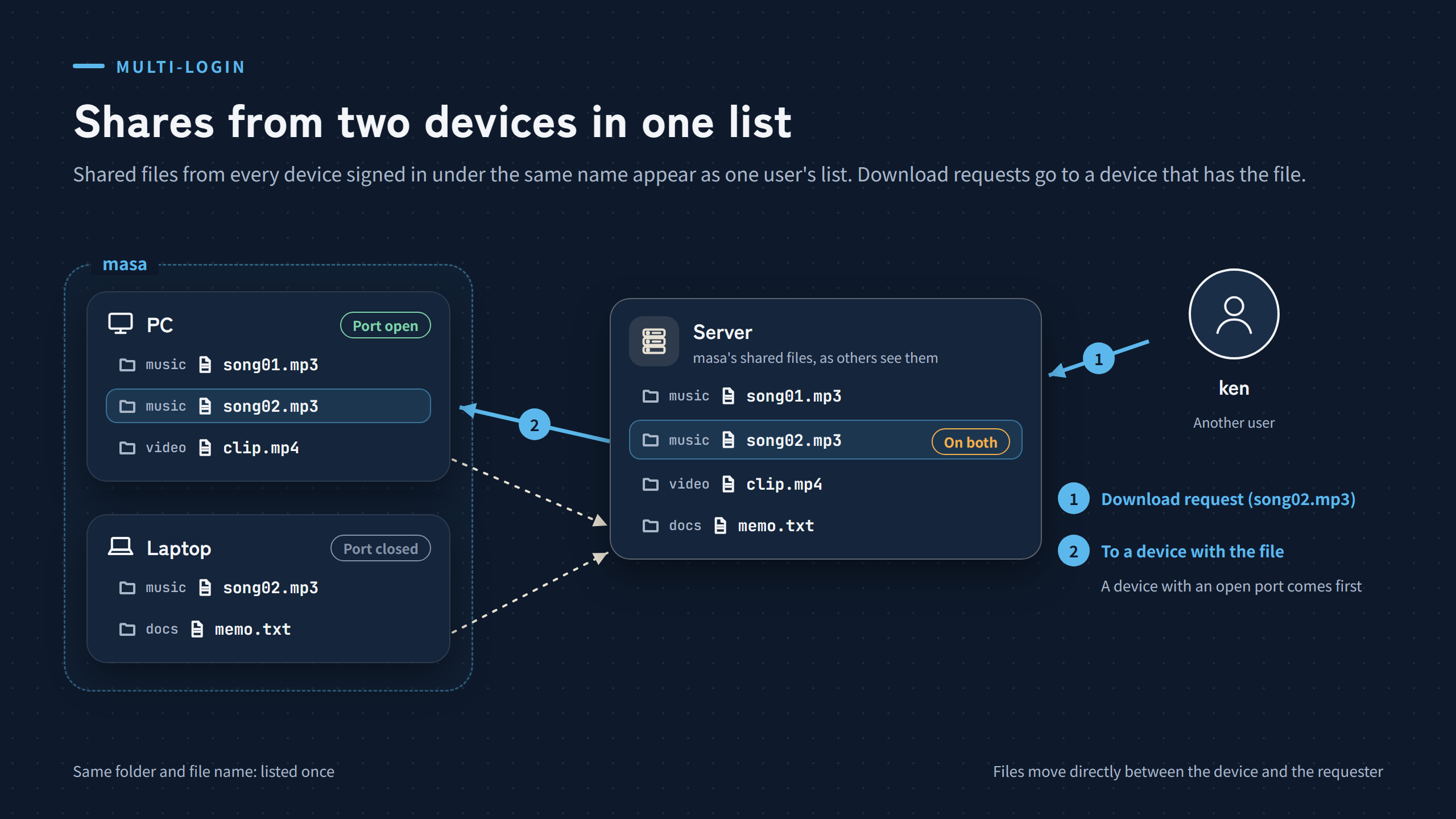
- Shared files from all devices appear as one user’s list
- A file with the same folder and file name is listed once
- Download requests go to a device that has the file, preferring a device with an open port
- Your other devices’ shared files do not appear in your own search results and cannot be downloaded by you
whois and the admin page
- whois shows the IP addresses and ports of all devices, separated by commas
- “Online users” in the admin page has one row per user; “Info” on the right-click menu shows each device’s IP address, port, software and sign-in time
Signing in again with the same name
In case an old connection was left behind by a dropped line, signing in again with the same name checks the old connection with the standard OpenNap ping. Only a connection that answered pings before and does not answer now is disconnected. Connections that have never answered, such as Utatane, are not disconnected.
Settings
| Where | “Multi-login” under “Login restrictions” in the settings |
| Default | Off (when off, a second sign-in is refused as before) |
| Switching | No restart needed; takes effect from the next sign-in. Connected devices are not disconnected |
| Number of devices | No limit. The per-IP connection limit (3 by default) and the server’s capacity count each device |
| Who can use it | Registered users only |
Devices can be added only by signing in to the same server. While the same account is signed in on another linked server, it cannot sign in to this server (as before).