This page gives a short introduction to how NAPTIFY works, for anyone who has never run a server on their own PC. The actual steps are in Getting started and the User manual.
What is a home server?
A home server is a PC at home that is made reachable from the internet so that other people can connect to it. The PC running naptify-server becomes the server, and users connect to it to find files and chat. Users can connect only while the PC is on and naptify-server is running.
Only operators need to run a server. If you just want to use NAPTIFY, you do not need your own server; connect to a published server from a client.
How hybrid P2P works
P2P (peer-to-peer) is a way for users’ PCs to connect to each other directly and exchange data. OpenNap, which NAPTIFY uses, is a hybrid P2P system: it combines P2P with a server, and the server only handles searches and brokers connections.
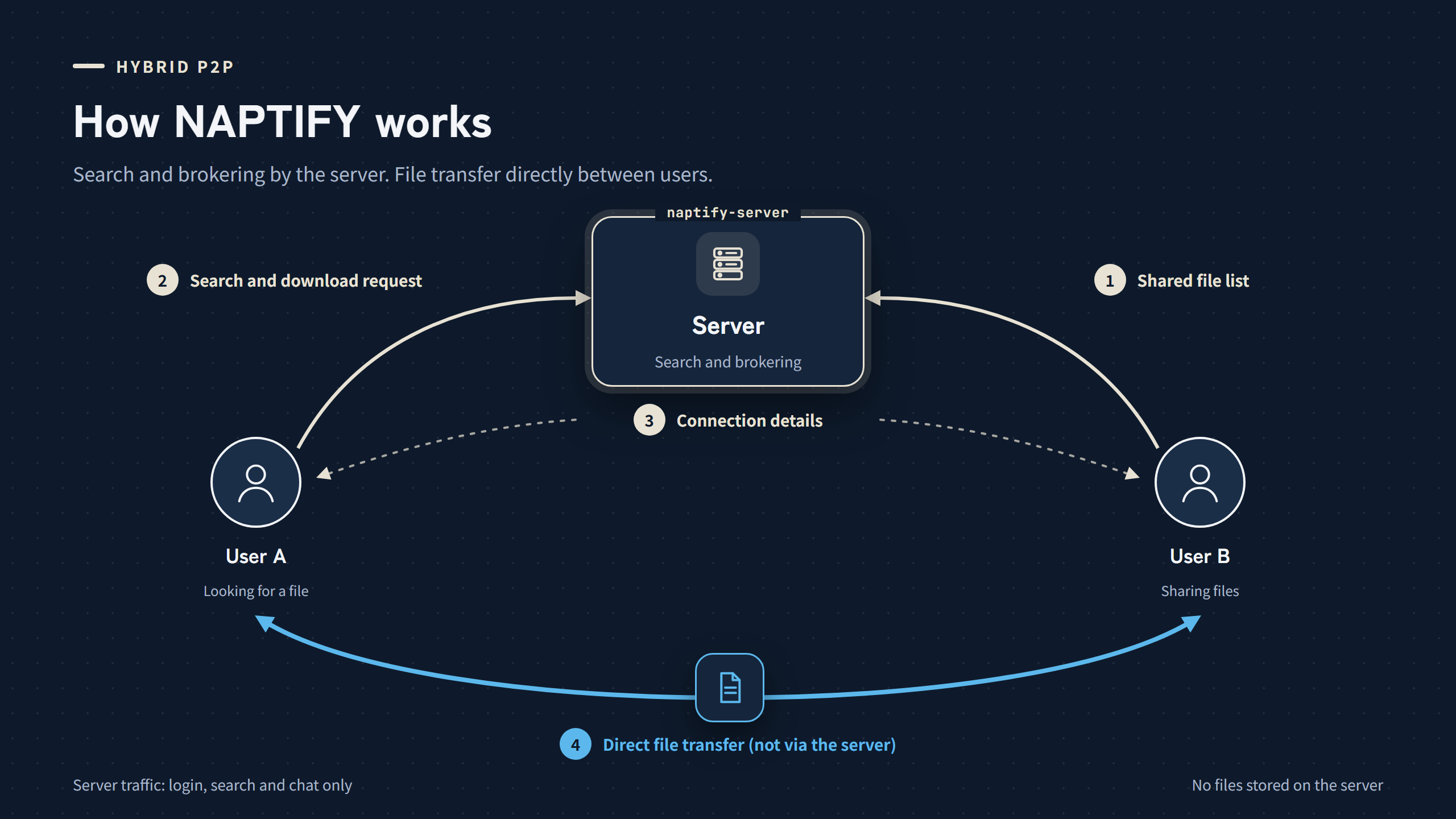
- Users log in to the server with a client and tell it which files they share (file names and similar details).
- When another user searches, the server looks through these lists and returns the results.
- When a download starts, the server tells each side how to reach the other and brokers the connection.
- The file itself travels directly between the users’ PCs and never passes through the server.
Because files are never stored on the server, the server’s connection does not carry the heavy traffic.
OpenNap and NAPTIFY
OpenNap is a protocol (a set of communication rules) for sharing files over hybrid P2P. NAPTIFY provides software that follows it.
| naptify-server | The server software. It runs on the operator’s PC and accepts connections from users. |
| OpenNap client | The software that users run. Existing clients such as Utatane can connect to naptify-server. |
| naptify-client | A client planned for NAPTIFY. |
What you need to run a server
- A PC — a Windows 11 PC to run naptify-server. Keep it switched on while the server is public.
- An internet connection — one that can stay connected. Depending on your contract, connections from outside may not be possible.
- A host name — a name for the server address that users can use instead of an IP address (the number that identifies a device on a network). For details, see Getting a host name.
- Port forwarding — a router setting that delivers connections from outside to the server PC. A port is a number that tells which program on a PC a connection is for. The steps are explained in Port forwarding.
A request about sharing files
Please do not share illegal files, such as files that infringe copyright. If you run a server, please use bans, blocked filenames, terms acceptance, and other features to keep illegal sharing off your server. See the Terms of use for details.
What to read next
See the setup steps and the frequently asked questions.